# Set user custom data

![](https://476758574-files.gitbook.io/~/files/v0/b/gitbook-x-prod.appspot.com/o/spaces%2FVctm8W2AAd8SbIYUaj27%2Fuploads%2Fsp6T6EwowgmcZvIhfXUO%2Fimage.png?alt=media\&token=27295ecb-69c3-4b1b-9510-7b8c14c3a9b4)

{% tabs %}
{% tab title="Entry Vars" %}
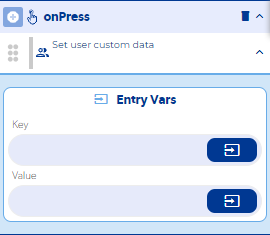
**Key :** You must enter the name that will be assigned or will have the custome data to save or update.

**Value :** You must enter the value that will be assigned to the custome data to save or update.

**Step by Step :**

<figure><img src="https://476758574-files.gitbook.io/~/files/v0/b/gitbook-x-prod.appspot.com/o/spaces%2FVctm8W2AAd8SbIYUaj27%2Fuploads%2F9WoYFC6dADAargeNgE7N%2Fset%20custom%20data.gif?alt=media&#x26;token=6817226b-448a-4311-b5e3-ab63abc0b262" alt=""><figcaption></figcaption></figure>
{% endtab %}

{% tab title="Callbacks & OutVars" %}
**error :** It is executed when a mandatory field was not entered or a connection was not achieved.

OutVars

`Null`

**notLoggedIn :** It is executed when a logged in user is not found.

OutVars

`Null`

**then :**  It is executed once the custom data is successfully stored in the user.

OutVars

`Null`
{% endtab %}

{% tab title="Features" %}

{% endtab %}

{% tab title="examples" %}

{% endtab %}
{% endtabs %}